

For many stores, scheduling in Excel is the first step: free, familiar and a weekly schedule is up fast. We built an Excel sheet set up for a retail week, with a block per role, room for evenings and weekends, and an hours total per employee. On this page you'll read what's in it, how to fill it in and what to watch for as your team or number of stores grows.
Download the free Excel template
What's in the Excel template?
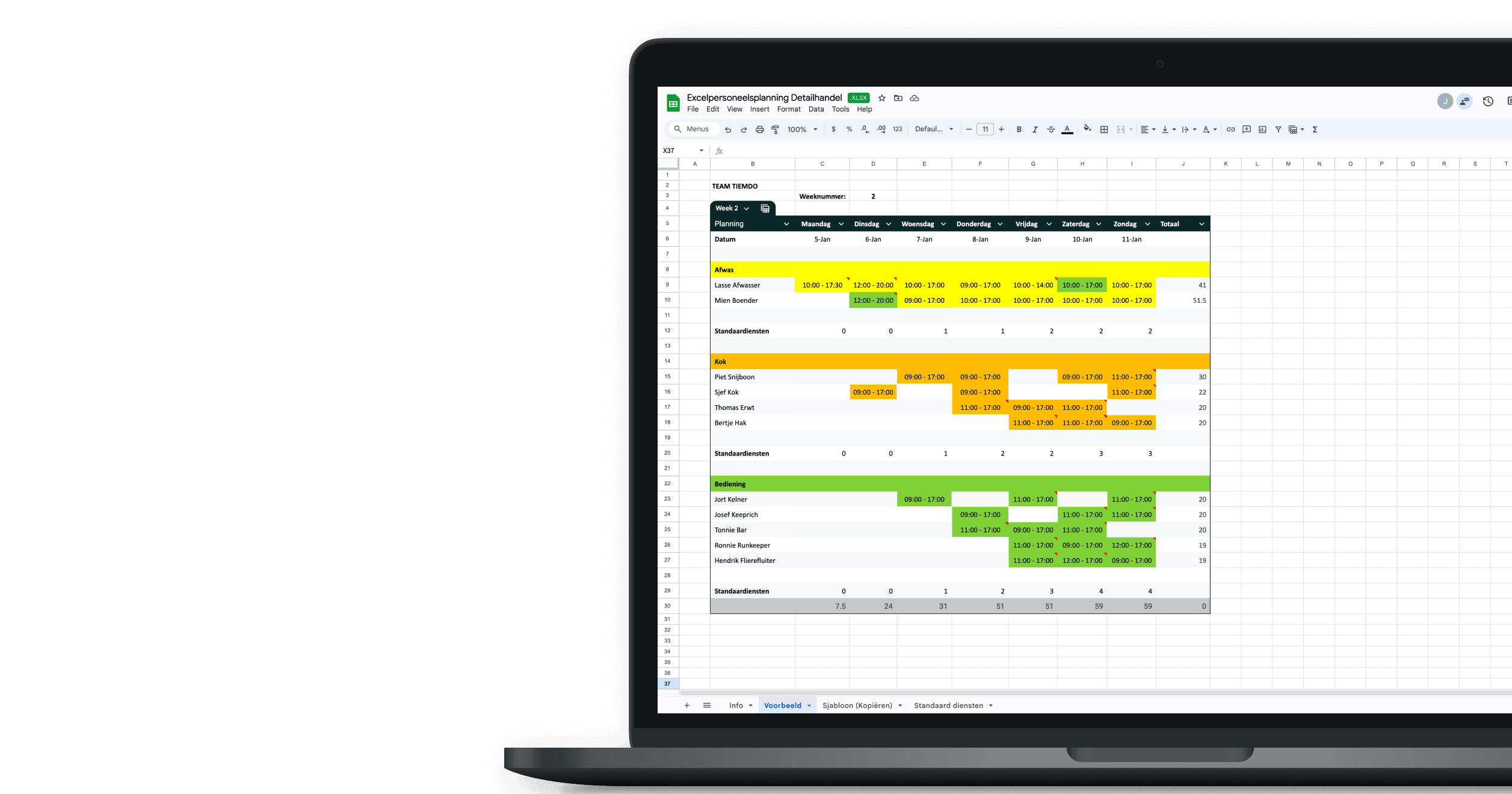
The sheet has four tabs. Info explains briefly how to use it. Example shows a filled-in week for a made-up store. Template is the blank version you copy each week and name after the week number. On Standard shifts you set your fixed shift times, for example an opening shift of 08:30 - 14:00 or a late shift of 14:00 - 21:00, so you write them the same way everywhere.
The schedule runs Monday to Sunday with a block per role: checkout, sales floor and stockroom. Below each you list your staff and enter a shift per day. The Total column adds up that employee's hours for the week, handy for checking whether part-timers and weekend staff reach their contracted hours. Each role has a Standard shifts row for the minimum you need per day. Roles, names and shifts are yours to adjust; with more than one store, copy the tab per location. To add someone, copy an existing row so the hours total keeps working.
Download the free Excel template
How to schedule staff in Excel for your store
In a store the frame is fixed: your opening hours set when someone has to be in. So start each day with the base cover in the Standard shifts row: who opens, who closes, who's on the register. Then add the busy moments: weekends, late-night openings and periods like the holidays or a sale. Those are the days you want an extra person on the floor, not just on the register.
Place your permanent staff first. They have contracted hours to fill, so put them in and check the Total column. Then add part-timers, students and weekend staff on the slots still open; that group often has different availability each week, so collect it before you plan.
Check each employee's weekly total last. Too many under-hours for a part-timer, or steady overtime for a permanent, only shows in Excel if you check it yourself. Then copy the tab for next week; the fixed shifts stay, you only change the exceptions.
What Excel doesn't watch (but the law does)
The sheet counts hours but enforces no rules. Working-time law sets how much rest staff need between shifts, break lengths, weekly hour caps and extra limits for under-18s — and it differs by country, and often by state or region. Opening hours on Sundays or holidays may be restricted where you are, and any weekend or evening premium is down to your own rules or agreement, not the sheet. However you schedule, make sure the result meets the rules where you operate.
When Excel gets too small
For a small store with a steady team the sheet works fine. It strains once you're working with lots of part-timers and students whose availability changes weekly, or you're planning several stores and want cover across them in one view. Swaps and sick calls are manual edits, several versions of the schedule go around and at month end you retype the hours into payroll. What the schedule cost only shows up in the pay run. At that point Excel costs you more time than it saves.
Save time by automating your schedules and cut the risk of mistakes. Staff share their availability in the app, you see labor costs as you plan, staff clock in via the app and hours flow straight into payroll. You're up and running right after signing up, from €1 per employee. We'll let you know when your trial is nearly over.
Frequently asked questions
Is the Excel template really free?
Yes. You request it with your email address and get the sheet straight in your inbox.
Does the template work in Google Sheets?
Yes, you can open and edit it in Google Sheets or Numbers.
Which stores is the sheet suitable for?
Any store with varying shifts: clothing, footwear, pharmacy, hardware, specialty. Adjust the roles to your own store.
Can I plan several stores in one file?
Yes, make a tab per store. If you want cover and hours across stores, that's the point to look at scheduling software.
Can I move my Excel schedule to Tiemdo later?
Yes. You transfer your staff and fixed shifts once, then carry on planning in Tiemdo.